The End of Design-to-Developer Friction? 5 Game-Changing Claude Design Features You Can't Ignore
Claude Design's latest update isn't about creating better images. It's about eliminating the gap between design, development, and deployment. Here's why this could fundamentally change how digital products are built in 2026 and beyond.

Design isn't the hard part.
What’s truly difficult is everything that comes after.
Creating a design.
Revising it.
Sending it to developers.
Receiving feedback.
Making more revisions.
And finally launching the product.
This is where most ideas lose momentum.
Even great concepts often fail to make it to reality because the path from idea to execution is simply too complicated.
I've used countless AI tools over the years, and I always found myself asking the same question:
"This looks great, but what happens next?"
When I looked at Claude Design’s latest update, one thought immediately came to mind:
The competition is no longer about who can generate the prettiest designs.
It's about who can turn ideas into real products the fastest.
The Bottom Line
Let's start with the conclusion.
This update is not primarily about improving design quality.
It's about eliminating the gap between design and implementation.
That's the real story.
Most projects don't get stuck because of poor design.
They get stuck because everything after the design is complicated.
Claude Design is clearly trying to solve that problem.
If you look at this update as merely another AI image-generation feature, you're missing the bigger picture.
What Most People Are Overlooking
When people discuss AI design tools, they usually focus on output quality.
How beautiful is it?
How realistic is it?
How professional does it look?
But in real-world business environments, the more important question is:
"Can I actually use this immediately?"
A beautiful design still requires revisions, development, collaboration, and deployment.
That means time.
And time is often the most expensive resource.
This update addresses exactly that issue.
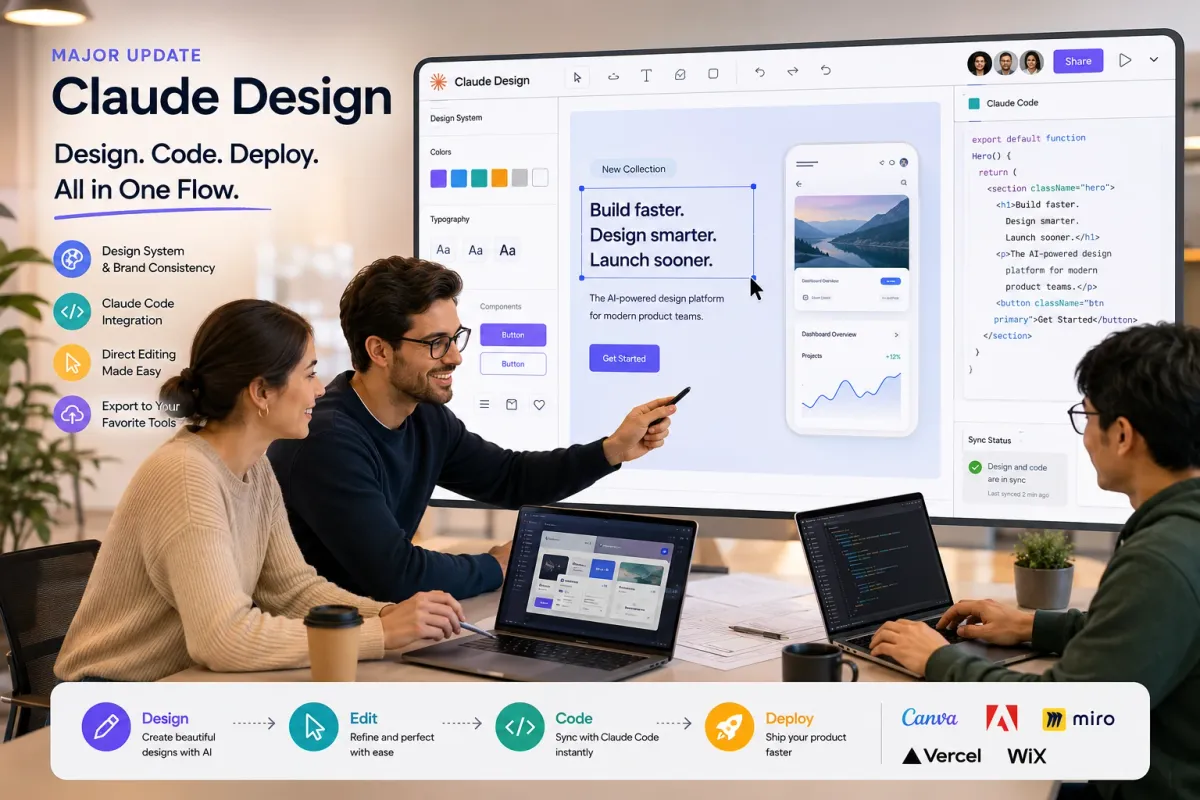
1. Brand Consistency Through Design Systems
One of the most frustrating parts of using AI design tools is inconsistency.
Yesterday's design looks like it came from one company.
Today's design looks like it came from another.
Different colors.
Different fonts.
Different styles.
You end up spending more time fixing than creating.
Claude Design now allows users to establish a design system.
This includes:
- Logos
- Brand colors
- Typography
- Components
- Button styles
- Visual guidelines
Once those rules are set, Claude follows them consistently across future projects.
That may sound like a small improvement.
It's not.
For businesses, consistency is often more valuable than creativity.
2. The Real Game-Changer: Claude Code Integration
This is where things get interesting.
I've learned something after years of working with digital products:
Creating a design is relatively easy.
Turning it into a working product is where the real challenge begins.
That's why Claude Code integration matters.
The traditional workflow looks something like this:
Design created
↓
Sent to developers
↓
Explained repeatedly
↓
Modified
↓
Sent back
↓
Revised again
And the cycle continues.
Claude Design changes that equation.
Designs can now sync directly with Claude Code.
When the design changes, the code can reflect those changes as well.
Design and development stop operating in separate worlds.
To be honest, this is the feature that defines the entire update.
Everything else is secondary.
Pause for a Moment
Ask yourself one question.
Do you need more design features?
Or do you need a faster way to turn ideas into actual products?
Many people confuse the two.
And that distinction matters more than ever.
3. Direct Editing Finally Feels Practical
Older AI design tools often created a frustrating experience.
Imagine wanting to move a button slightly to the left.
You'd have to generate a new prompt.
Want larger text?
Another prompt.
Need a different alignment?
Yet another prompt.
It became exhausting.
Now users can edit directly.
- Drag and drop elements
- Resize components
- Rearrange layouts
- Adjust positioning
- Fine-tune alignment
In practice, it feels much closer to working inside Canva or a traditional design application.
That may not sound revolutionary.
But it dramatically improves usability.
4. Exporting to Real-World Tools
This feature deserves more attention than it's getting.
The best platforms don't try to do everything.
They focus on what they do best and integrate with the rest.
Claude Design appears to be taking that approach.
Finished projects can be exported to:
- Canva
- Adobe
- Miro
- Vercel
- Wix
Imagine this workflow:
Create the concept in Claude Design
↓
Refine it in Canva
↓
Deploy it through Vercel
Simple.
Efficient.
And much faster than traditional workflows.
What About Pricing?
This is the question many users are asking.
Currently, Claude Design is available to paid subscribers only.
Supported plans include:
- Claude Pro
- Claude Max
- Claude Team
- Claude Enterprise
At this time, free-tier users do not have access.
The good news is that there are no additional charges beyond the existing subscription plans.
How Beginners Should Get Started
Don't overcomplicate it.
In fact, that's often the biggest mistake.
Here's what I'd recommend.
Start simple.
Try a prompt like:
"Create three Instagram post concepts for a coffee shop promotion."
Or:
"Design a landing page for a health supplement brand."
Then spend a few minutes adjusting the layout yourself.
Move elements around.
Change text.
Resize sections.
Finally, export the result as a PDF, PowerPoint presentation, or transfer it into Canva for final polishing.
That's enough to understand what this update is really about.
Why This Matters for the Future of AI Design
For years, the main question was:
"Which tool creates the best-looking designs?"
That question is changing.
The new question is:
"Which tool gets me from idea to launch the fastest?"
That's why I don't see this as a simple feature update.
I see it as a signal.
A signal that AI design tools are evolving from image generators into full-scale production platforms.
And that's a much bigger shift.
Frequently Asked Questions (FAQ)
What is Claude Design?
Claude Design is an AI-powered design platform developed by Anthropic that helps users create, edit, and manage visual designs while integrating directly with development workflows.
What is the biggest change in the June 2026 Claude Design update?
The most significant update is the integration between design and implementation. Users can now connect design workflows with Claude Code, reducing the gap between design creation and product development.
Can Claude Design generate production-ready code?
Claude Design itself focuses on design creation and editing, but through its integration with Claude Code, users can streamline the process of transforming designs into working code.
Is Claude Design available for free users?
Currently, Claude Design is available only to paid subscribers, including Pro, Max, Team, and Enterprise plans.
How does Claude Design compare to Canva and Figma?
Claude Design focuses heavily on AI-assisted workflows and design-to-development integration. Canva excels in content creation and marketing assets, while Figma remains a leading collaborative design platform for professional UI/UX teams.
Can beginners use Claude Design?
Yes. Beginners can create designs using simple natural-language prompts and then refine layouts using direct editing tools without advanced design knowledge.
Does Claude Design support brand consistency?
Yes. Users can define brand guidelines such as colors, logos, typography, and design components, allowing Claude Design to generate more consistent outputs across projects.
Which external platforms can Claude Design connect with?
The platform supports exporting and workflow integrations with tools such as Canva, Adobe, Miro, Vercel, and Wix.
Why does this update matter for startups and entrepreneurs?
It reduces the time between idea creation and product launch by connecting design, development, and deployment into a more unified workflow.
Is Claude Design replacing traditional design tools?
Not necessarily. Instead, it is becoming a bridge between AI-assisted design generation and professional design ecosystems, making existing workflows faster and more efficient.
Final Thoughts
The conclusion is simple.
The most important part of this Claude Design update isn't the design quality.
It's the ability to connect design, development, and deployment into a single workflow.
If you've ever struggled with any of the following:
- Great ideas that never became products
- Designs that stalled during development
- Limited resources and small teams
- Building products on your own
Then this update is worth paying attention to.
At that point, the answer becomes fairly obvious.
The next step isn't more research.
It's testing the workflow yourself and seeing how much friction disappears from your process.
So here's my question:
Where do you spend most of your time today?
Creating the design?
Or dealing with everything that comes after it?